

Hibernate is an Object-Relational Mapping(ORM) solution for JAVA and it raised as an open source persistent framework created by Gavin King in 2001.This is a powerful, high performance Object-Relational Persistence and Query service for any Java Application.
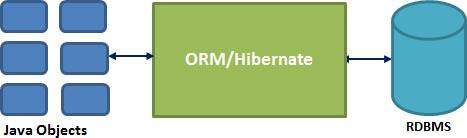
Hibernate maps all Java classes to database tables and from Java data types to SQL data types and relieve the developer from 95% of common data persistence related programming tasks.
Hibernate placed between traditional Java objects and database server to handle all the work in persisting those objects based on the appropriate O/R mechanisms and patterns.
Hibernate placed between traditional Java objects and database server to handle all the work in persisting those objects based on the appropriate O/R mechanisms and patterns.
Hibernate Advantages:
Hibernate takes care of mapping Java classes to database tables using XML files and without writing any line of code.
It helps to provides simple APIs for storing and retrieving Java objects directly to and from the database.
And if there is change in Database or in any table then the only need to change XML file properties.
It also abstract away the unfamiliar SQL types and provide us to work around familiar Java Objects.
Hibernate also does not require an application server to operate.
You should manipulates Complex associations of objects of your database.
You should minimize database access with the help of smart fetching strategies.
Provides Simple querying of data.
Supported Databases:
Hibernate supports almost all the major RDBMS.There is a list of few of the database engines supported by Hibernate.
HSQL Database Engine
DB2/NT
MySQL
PostgreSQL
FrontBase
Oracle
Microsoft SQL Server Database
Sybase SQL Server
Informix Dynamic Server
Supported Technologies:
Hibernate supports a variety of other technologies, including the below:
XDoclet Spring
J2EE
Eclipse plug-ins
Maven
The Hibernate architecture is layered to keep you isolated from having to know the underlying APIs. Hibernate uses of the database and configuration data to provide persistence services (and persistent objects) to the application.
Following is a very high level view of the Hibernate Application Architecture.
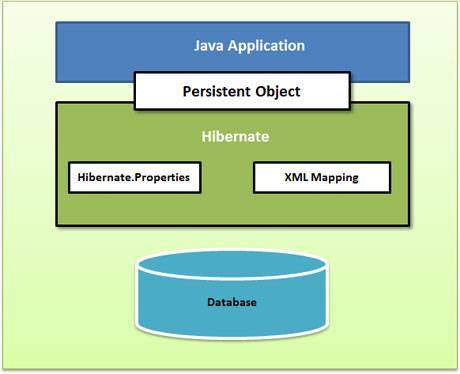 Following is a brief view of the Hibernate Application Architecture with few important core classes.
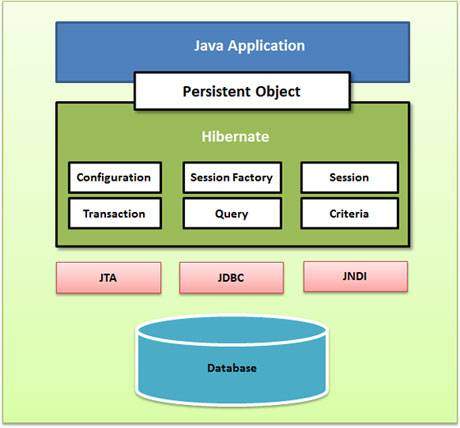 Hibernate uses various existing Java APIs, like JDBC, Java Transaction API, and Java Naming and Directory Interface (JNDI). JDBC provides a rudimentary level of abstraction of functionality common to relational databases, that allowing almost any database with a JDBC driver to be supported by Hibernate. JNDI and Java Transaction API allow Hibernate to be integrated with J2EE application servers.
Following section gives detailed description of each of the class objects involved in Hibernate Application Architecture.
Configuration Object:
The Configuration object is the first Hibernate object you create in any Hibernate application and usually created only once during application initialization. It also represents a configuration or properties file required by the Hibernate.
Here the Configuration object provides two keys components:
Database Connection: This is handled through one or more configuration files supported by Hibernate. These files are hibernate.properties and hibernate.cfg.xml.
Class Mapping Setup
This component creates the connection between the Java classes and database tables..
SessionFactory Object:
Configuration object is used to create a SessionFactory object which inturn configures Hibernate for the application using the supplied configuration file and allows for a Session object to be instantiated. Also the SessionFactory is a thread safe object and used by all the threads of an application.
The SessionFactory is heavyweight object so usually it is created during application start up and kept for later use. And you would need one SessionFactory object per database using a separate configuration file. Then ,if you are using multiple databases then you would have to create multiple SessionFactory objects.
Session Object:
A Session is used to get a physical connection with a database. This Session object is lightweight and designed to be instantiated each time an interaction is needed with the database. Also persistent objects are saved and retrieved through a Session object.
The session objects must not be kept open for a long time because they are not usually thread safe and they should be created and destroyed them as needed.
Transaction Object:
A Transaction represents a unit of work with the database and most of the RDBMS supports transaction functionality. Transactions in the Hibernate framework are handled by an underlying transaction manager and transaction (from JDBC or JTA).
This is an optional object and also Hibernate applications may choose not to use this interface, instead managing transactions in their own application code.
Query Object:
Query objects use SQL or Hibernate Query Language (HQL) string to retrieve data from the database and create objects. A Query instance is always used to bind query parameters, also limit the number of results returned by the query, and finally to execute the query.
Criteria Object:
The criteria object are used to create and execute object oriented criteria queries to retrieve objects.
This chapter will explain how to install Hibernate and other associated packages to prepare a develop environment for the Hibernate applications. Make sure you already have setup for MySQL database.
Downloading Hibernate:
It is assumed that you already have latest version of Java is installed on your machine. Following are the simple steps to download and install Hibernate on your machine.
Make a choice whether you want to install Hibernate on Windows, or Unix and then proceed to the next step to download .zip file for windows and .tz file for Unix.
At the time of writing this tutorial I downloaded hibernate-distribution-3.6.4.In final step and when you unzip the downloaded file it will give you directory structure as follows.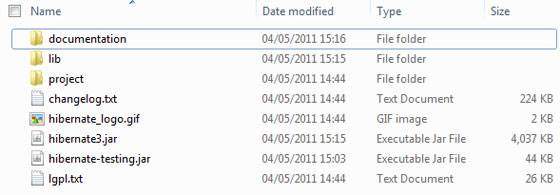
Installing Hibernate:
Once you downloaded and unzipped the latest version of the Hibernate Installation file, you required to perform following two simple steps. First make sure you are setting your CLASSPATH variable properly otherwise you will face problem while compiling your application.
· Now copy all the library files from /lib into your CLASSPATH, and change your classpath variable to include all the JARs:
· Now copy that hibernate3.jar file into your CLASSPATH. This file lies in the root directory of the installation and is the primary JAR that Hibernate needs to do its work.
Hibernate Prerequisites:
Following is the list of the packages/libraries required by Hibernate and you should install them before starting with Hibernate. So to install these packages you would have to copy library files from /lib into your CLASSPATH, and then change your CLASSPATH variable accordingly.


No comments:
Post a Comment